



07-Numpy (brief)
ipynb35 kBPython · 24 cellsSlides of chapter 0
The numpy module
Introduction
Numpy is a Python package, it stands for numerical python. Using numpy we can perform operations such as:
- Mathematical and logical operations on arrays
- Operations related to linear algebra
- Built-in functions for random number generation
import numpy as npThe ndarray object
The most important object defined in NumPy is an N-dimensional array type called ndarray:
- It describes the collection of items of the same type
- Items in the collection can be accessed using a zero-based index
L = [1, 2, 3]
a = np.array(L)
print(a)
[1 2 3]
L = [[1, 2, 3], [4, 5, 6]]
a = np.array(L)
print(a)
[[1 2 3] [4 5 6]]
Computing the length of the array in numpy is done via the shape attribute:
print(a.shape)(2, 3)
Unlike Python lists, you can specify the data-type of the items in a numpy array. Python automatically casts all the items to the specified dtype. Once you specify the dtype, mixed types will not be allowed.
a_mixed = np.array([1, 'CSC243'])
print(a_mixed)
a_float = np.array([1, 2, 3 ], dtype=float)
print(a_float)
['1' 'CSC243'] [1. 2. 3.]
Creating ndarray objects
Numpy ndarrays are created:
- As empty
- As zeros
- As ones
- From existing data
import numpy as np

a = np.empty((3,4), dtype=float)
print(a)
a = np.zeros((2,4))
print(a)
a = np.ones((3,2))
print(a)
a = np.ones((3,), dtype=int)
print(a)
[[0. 0. 0. 0.] [0. 0. 0. 0.] [0. 0. 0. 0.]] [[0. 0. 0. 0.] [0. 0. 0. 0.]] [[1. 1.] [1. 1.] [1. 1.]] [1 1 1]
Ranges
You can create ranges of data through:
np.arange(start, stop, step, dtype): returns anndarrayobject containing evenly spaced values within a given range.np.arange(stop, dtype): returns anndarrayobject containing evenly spaced values from 0 till stop-1.np.linspace(start, stop, num, dtype): instead of step size, the number num of evenly spaced values in the interval is specified.
import numpy as np

r = np.arange(1.5, 2, 0.1)
print(r)
r = np.arange(5)
print(r)
r = np.linspace(10, 50, 5)
print(r)
[1.5 1.6 1.7 1.8 1.9] [0 1 2 3 4] [10. 20. 30. 40. 50.]
One advantage of using numpy.arange instead of range is that the step-size can
be of type float in this case.
Math functions using numpy
Mathematical functions can also be accessed from the numpy module (sin,
cos, exp, ceil, floor, etc.). The advantage of using numpy functions is that we can pass a full array as an input (in contrast to the functions from the math module, which take a single value as input).
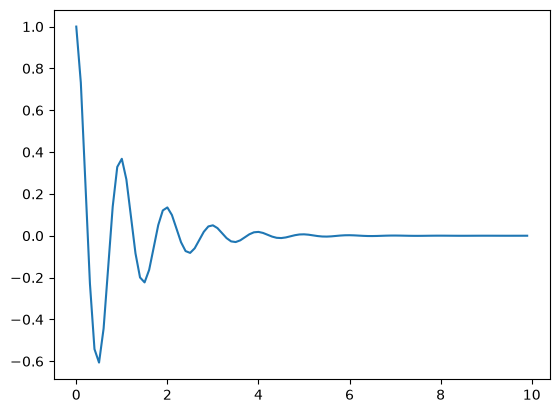
Example: plotting exp(-x)*cos(2πx), for x = [0, 0.1, 0.2, …, 9.9]
import numpy as np
from math import pi
import matplotlib.pyplot as plt

X = np.arange(0, 10, 0.1)
Y = np.exp(-X)*np.cos(2*pi*X)
print(Y)
plt.plot(X, Y)
[ 1.00000000e+00 7.32028848e-01 2.53001717e-01 -2.28925420e-01 -5.42300309e-01 -6.06530660e-01 -4.43997940e-01 -1.53453298e-01 1.38850286e-01 3.28921764e-01 3.67879441e-01 2.69298364e-01 9.30741301e-02 -8.42169556e-02 -1.99501135e-01 -2.23130160e-01 -1.63337714e-01 -5.64523135e-02 5.10801656e-02 1.21003555e-01 1.35335283e-01 9.90693315e-02 3.42400590e-02 -3.09816865e-02 -7.33923659e-02 -8.20849986e-02 -6.00885870e-02 -2.07676456e-02 1.87913428e-02 4.45147201e-02 4.97870684e-02 3.64455703e-02 1.25962138e-02 -1.13975255e-02 -2.69995426e-02 -3.01973834e-02 -2.21053558e-02 -7.63998984e-03 6.91294868e-03 1.63760504e-02 1.83156389e-02 1.34075760e-02 4.63388808e-03 -4.19291532e-03 -9.93257663e-03 -1.11089965e-02 -8.13210594e-03 -2.81059519e-03 2.54313170e-03 6.02441225e-03 6.73794700e-03 4.93237158e-03 1.70471216e-03 -1.54248735e-03 -3.65399074e-03 -4.08677144e-03 -2.99163459e-03 -1.03396019e-03 9.35565868e-04 2.21625741e-03 2.47875218e-03 1.81451810e-03 6.27128556e-04 -5.67449383e-04 -1.34422807e-03 -1.50343919e-03 -1.10056086e-03 -3.80372697e-04 3.44175449e-04 8.15315539e-04 9.11881966e-04 6.67523905e-04 2.30707703e-04 -2.08752962e-04 -4.94513872e-04 -5.53084370e-04 -4.04873715e-04 -1.39931295e-04 1.26615072e-04 2.99937825e-04 3.35462628e-04 2.45568321e-04 8.48726207e-05 -7.67959230e-05 -1.81921487e-04 -2.03468369e-04 -1.48944716e-04 -5.14778466e-05 4.65790818e-05 1.10340959e-04 1.23409804e-04 9.03395368e-05 3.12228923e-05 -2.82516412e-05 -6.69251749e-05 -7.48518299e-05 -5.47936988e-05 -1.89376414e-05 1.71354866e-05 4.05921705e-05]
Statistical Operations
We can compute the minimum and maximum through np.amin(a, axis=) and np.amax(a, axis=). The axis keyword specifies the dimension over which min/max is computed. If not specified, the min/max will be computed over the whole array.
import numpy as np

a = np.array([[1,2], [3,4], [5,6]])
print("a =\n" + str(a))
print("min:", np.amin(a))
print("minima (axis=0):", np.amin(a, axis=0))
print("minima (axis=1):", np.amin(a, axis=1))
a = [[1 2] [3 4] [5 6]] min: 1 minima (axis=0): [1 2] minima (axis=1): [1 3 5]
We can also compute the average (mean), median, standard deviation and variance. We use in these cases np.mean(), np.median(), np.std(), and np.var(), respectively. All these functions also admit an axis keyword parameter like np.amin.
Generation Random Numbers
We can generate random numbers using numpy.random. Here are a few examples:
import numpy.random as rand

x = rand.uniform(1, 10)
print(x)
2.7593254354391625
The random.uniform(x, y) function generates a uniformly-distributed random float in the real interval [x, y]. The default values are x=0, y=1.
a = 1
b = 5
y = rand.randint(a, b+1)
print(y)
1
The random.randint generates a random integer betweena and b inclusive. Multiple runs of the same code give different random numbers (that is whole point).